
-
Odoo - Navigation With Arrow Keys (userScript)
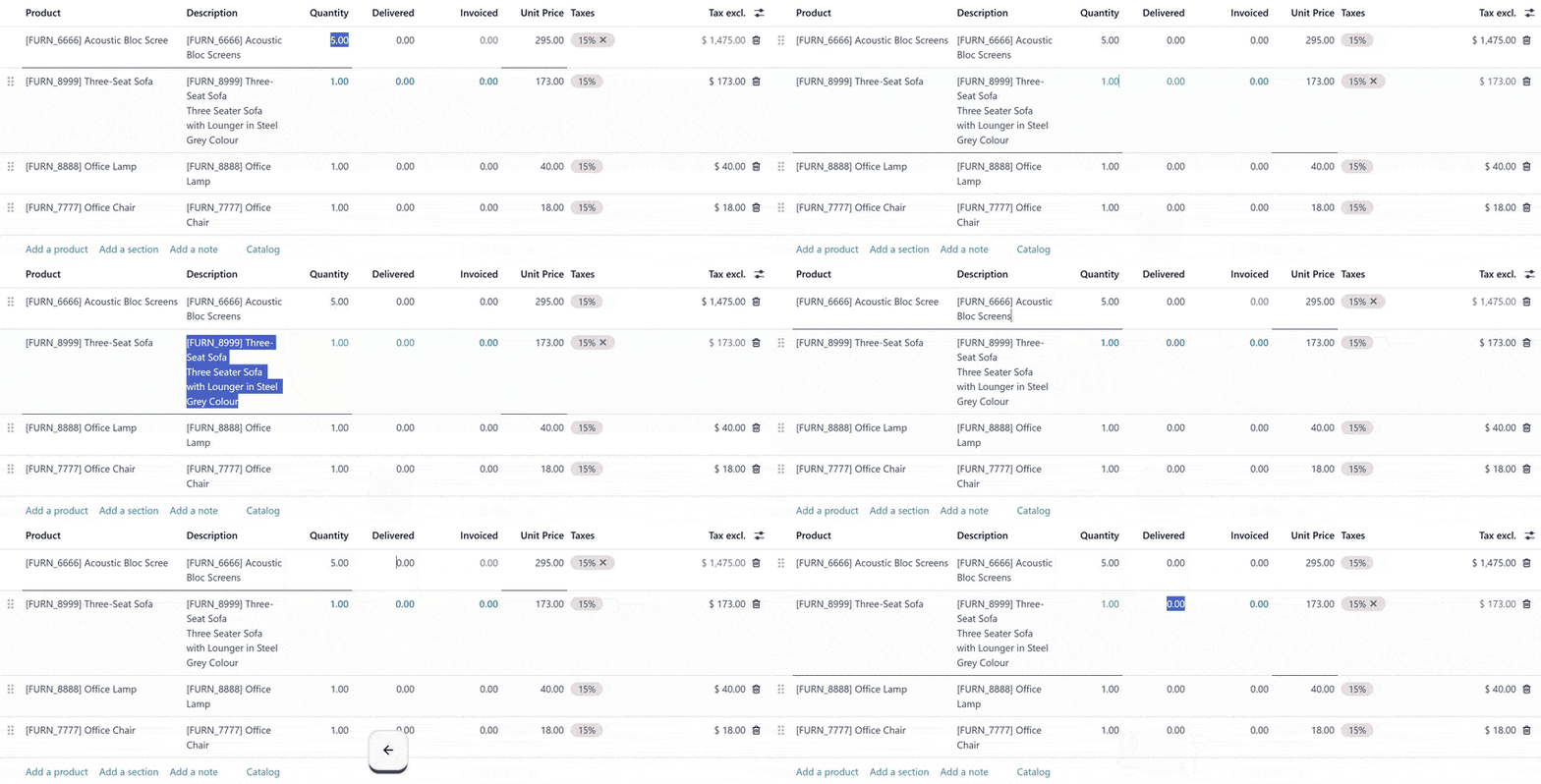
Odoo ERP için geliştirmiş olduğum bu userScript sayesinde metin kutuları arasında (input) klavye yön tuşları ile dolaşabilirsiniz.
Kullanım
Bu bir userScript betiğidir, çalıştırabilmek için kullandığınız tarayıcıda Tampermonkey, Violentmonkey vb. gibi bir komut dosyası yöneticisi yüklü olmalıdır.
Bilgilendirme
userScript bir tarayıcı komut dosyası olarak çalışır, yani sadece yüklediğiniz tarayıcı ile bu betiği kullanabilirsiniz. userScript hakkında detaylı bilgi edinmek için buraya tıklayabilirsiniz.
Test Edilen Sürümler
- Odoo 17.x (Chromium ve Tampermonkey ile test edildi)
- Odoo 18.x (Chromium ve Tampermonkey ile test edildi)
- Odoo 19.x (Chromium ve Tampermonkey ile test edildi)
Değişiklik günlüğü
1.2.1
- @match kısmı
*://*/*olarak değiştirildi, script artık mevcut sayfanın Odoo olup olmadığını "document.getElementById('web.layout.odooscript');" komutuyla tespit ediyor
1.2
- Satırlar arasına Bölüm (Section) veya Not (Note) satırları eklenmişse yukarı/aşağı oklar ile bu satırların atlanması sağlandı
1.1
- Artık hücre içindeyken sağ-sol oklar ile imleç hareket ettiriliyor. İmleç en uçtaysa hücreler arasında geçiş yapıyor.
1.0
Bu betiğin yayınlandığı ilk sürümdür.
Yükleme adımlarını görmek için tıklayın
- Kullandığınız tarayıcıya Tampermonkey, Violentmonkey vb. gibi bir komut dosyası yöneticisi yükleyin.
- Chromium tabanlı bir tarayıcı (Chrome, Edge, Opera vb.) kullanıyorsanız "Uzantılar" sayfasından geliştirici modunu etkinleştirin.
- Ardından uzantı seçeneklerinden "Kullanıcı Betiklerine İzin Ver" seçeneğini etkinleştirin.
- Tarayıcınızı yeniden başlatın.
- Aşağıdaki snippetin sağ üst köşesinde bulunan "Aç" butonuna tıklayın.
- Karşınıza yükleme ekranı çıkacaktır, Yükle butonuna tıklayarak yükleme işlemini tamamlayabilirsiniz. Olası bir güncelleme yayınlanması durumunda bu ekran otomatik olarak tekrar karşınıza çıkacaktır.
// ==UserScript==
// @name            Odoo Navigation With Arrow Keys
// @name:tr         Odoo Ok Tuşları İle Navigasyon
// @namespace       https://github.com/sipsak
// @version         1.2.1
// @description     Allows you to move between cells using arrow keys while in a table in Odoo
// @description:tr  Odoo'da tablo içindeyken ok tuşları ile hücreler arası geçiş yapmayı sağlar
// @author          Burak Şipşak
// @match           *://*/*
// @grant           none
// @icon            data:image/svg+xml;base64,PHN2ZyB3aWR0aD0iNTAiIGhlaWdodD0iNTAiIHZpZXdCb3g9IjAgMCA1MCA1MCIgeG1sbnM9Imh0dHA6Ly93d3cudzMub3JnLzIwMDAvc3ZnIj48cGF0aCBkPSJNNDQuNTIxIDUuNWE0LjQ3NyA0LjQ3NyAwIDAgMSAwIDYuMzMybC0zNC4xOSAzNC4xOUg0VjM5LjY5TDM4LjE5IDUuNWE0LjQ3NyA0LjQ3NyAwIDAgMSA2LjMzMSAwWiIgZmlsbD0iIzJFQkNGQSIvPjxwYXRoIGQ9Ik0xMC45IDE1LjEyMiA0Ljg5OCA5LjEyYTkuMDA0IDkuMDA0IDAgMCAwIDEwLjQ4IDEyLjU2OGwyMy4wMDEgMjNhNC40NzcgNC40NzcgMCAwIDAgNi4zMzEtNi4zM2wtMjMtMjMuMDAxQTkuMDA0IDkuMDA0IDAgMCAwIDkuMTQxIDQuODc3bDYuMDAyIDYuMDAyLTQuMjQzIDQuMjQzWiIgZmlsbD0iIzk4NTE4NCIvPjxwYXRoIGQ9Ik0yNS4wMjMgMTguNjcgMTguNjkgMjVsNi4zMzIgNi4zMzFMMzEuMzUyIDI1bC02LjMzLTYuMzMxWiIgZmlsbD0iIzE0NDQ5NiIvPjwvc3ZnPgo=
// @updateURL       https://sipsak.app/docs/scripts/Odoo-Navigation-With-Arrow-Keys.user.js
// @downloadURL     https://sipsak.app/docs/scripts/Odoo-Navigation-With-Arrow-Keys.user.js
// ==/UserScript==

(function() {
    'use strict';

    const scriptTag = document.getElementById('web.layout.odooscript');
    if (!scriptTag) {
        return;
    }

    function makeCellsFocusable() {
        document.querySelectorAll('table.o_list_table td').forEach(td => {
            if (!td.hasAttribute('tabindex')) td.setAttribute('tabindex', 0);
        });
    }

    function enterEditMode(cell) {
        var event = new MouseEvent('click', {
            bubbles: true,
            cancelable: true,
            view: window
        });
        cell.dispatchEvent(event);

        setTimeout(function() {
            const input = cell.querySelector('input, textarea, select');
            if (input && (input.tagName.toLowerCase() === 'input' || input.tagName.toLowerCase() === 'textarea')) {
                input.focus();
                input.select();
            }
        }, 150);
    }

    function isEditable(cell) {
        return cell.querySelector('input, textarea, select') !== null;
    }

    function getActiveInputElement() {
        const active = document.activeElement;
        if (['input', 'textarea', 'select'].includes(active.tagName.toLowerCase())) {
            return active;
        }

        const cell = active.closest('td');
        if (cell) {
            const input = cell.querySelector('input, textarea, select');
            if (input) return input;
        }

        return null;
    }

    function isAtStartOfInput(element) {
        if (!element || typeof element.selectionStart !== 'number') return true;
        return element.selectionStart === 0;
    }

    function isAtEndOfInput(element) {
        if (!element || typeof element.selectionEnd !== 'number' || typeof element.value !== 'string') return true;
        return element.selectionEnd === element.value.length;
    }

    function isAllTextSelected(element) {
        if (!element || typeof element.selectionStart !== 'number' || typeof element.selectionEnd !== 'number' || typeof element.value !== 'string') return false;
        return element.selectionStart === 0 && element.selectionEnd === element.value.length;
    }

    function isInputEmpty(element) {
        if (!element || typeof element.value !== 'string') return true;
        return element.value.trim() === '';
    }

    function navigateCell(e) {
        if (!['ArrowUp', 'ArrowDown', 'ArrowLeft', 'ArrowRight'].includes(e.key)) return;

        if (e.shiftKey || e.altKey || e.ctrlKey) return;

        const dropdown = document.querySelector('.o-autocomplete--dropdown-menu.show');
        if (dropdown) {
            return;
        }

        const inputElement = getActiveInputElement();

        if (inputElement) {
            if (isInputEmpty(inputElement)) {
            }
            else if (isAllTextSelected(inputElement)) {
                if (e.key === 'ArrowLeft') {
                    e.preventDefault();
                    inputElement.setSelectionRange(0, 0);
                    return;
                }
                if (e.key === 'ArrowRight') {
                    e.preventDefault();
                    inputElement.setSelectionRange(inputElement.value.length, inputElement.value.length);
                    return;
                }
            }
            else {
                if (e.key === 'ArrowLeft' && !isAtStartOfInput(inputElement)) {
                    return;
                }
                if (e.key === 'ArrowRight' && !isAtEndOfInput(inputElement)) {
                    return;
                }
            }
        }

        let cell;
        if (inputElement) {
            cell = inputElement.closest('td');
        } else {
            cell = e.target.closest('td');
        }

        if (!cell) return;

        e.preventDefault();

        const row = cell.parentElement;
        const cells = Array.from(row.querySelectorAll('td'));
        const cellIndex = cells.indexOf(cell);
        const table = cell.closest('table.o_list_table');
        if (!table) return;

        const rows = Array.from(table.querySelectorAll('tbody tr')).filter(r => r.querySelectorAll('td').length > 0);
        const rowIndex = rows.indexOf(row);

        let newRowIndex = rowIndex, newCellIndex = cellIndex;

        if (e.key === 'ArrowUp') {
            let tempRowIndex = rowIndex - 1;
            while (tempRowIndex >= 0) {
                const tempRow = rows[tempRowIndex];
                if (tempRow && !tempRow.classList.contains('o_is_line_section') && !tempRow.classList.contains('o_is_line_note')) {
                    newRowIndex = tempRowIndex;
                    break;
                }
                tempRowIndex--;
            }
        } else if (e.key === 'ArrowDown') {
            let tempRowIndex = rowIndex + 1;
            while (tempRowIndex < rows.length) {
                const tempRow = rows[tempRowIndex];
                if (tempRow && !tempRow.classList.contains('o_is_line_section') && !tempRow.classList.contains('o_is_line_note')) {
                    newRowIndex = tempRowIndex;
                    break;
                }
                tempRowIndex++;
            }
        } else if (e.key === 'ArrowRight') {
            let tempIndex = newCellIndex;
            while (tempIndex < cells.length - 1) {
                tempIndex++;
                if (isEditable(cells[tempIndex])) {
                    newCellIndex = tempIndex;
                    break;
                }
            }
            if (newCellIndex === cellIndex) return;
        } else if (e.key === 'ArrowLeft') {
            let tempIndex = newCellIndex;
            while (tempIndex > 0) {
                tempIndex--;
                if (isEditable(cells[tempIndex])) {
                    newCellIndex = tempIndex;
                    break;
                }
            }
            if (newCellIndex === cellIndex) return;
        }

        if (newRowIndex === rowIndex && newCellIndex === cellIndex) return;

        const newCells = Array.from(rows[newRowIndex].querySelectorAll('td'));
        if (newCellIndex < 0 || newCellIndex >= newCells.length) return;

        const newCell = newCells[newCellIndex];
        if (!newCell) return;

        newCell.focus();

        setTimeout(function() {
            enterEditMode(newCell);
        }, 100);
    }

    makeCellsFocusable();
    document.addEventListener('keydown', navigateCell, true);
    setInterval(makeCellsFocusable, 1000);
})();